DJ Dog controls: the bar under the reels, read button by button
Everything you can touch in this game sits in one horizontal strip beneath the grid, plus a thin system row below that. This page reads that strip from a capture of the running game rather than from anybody's description of it.
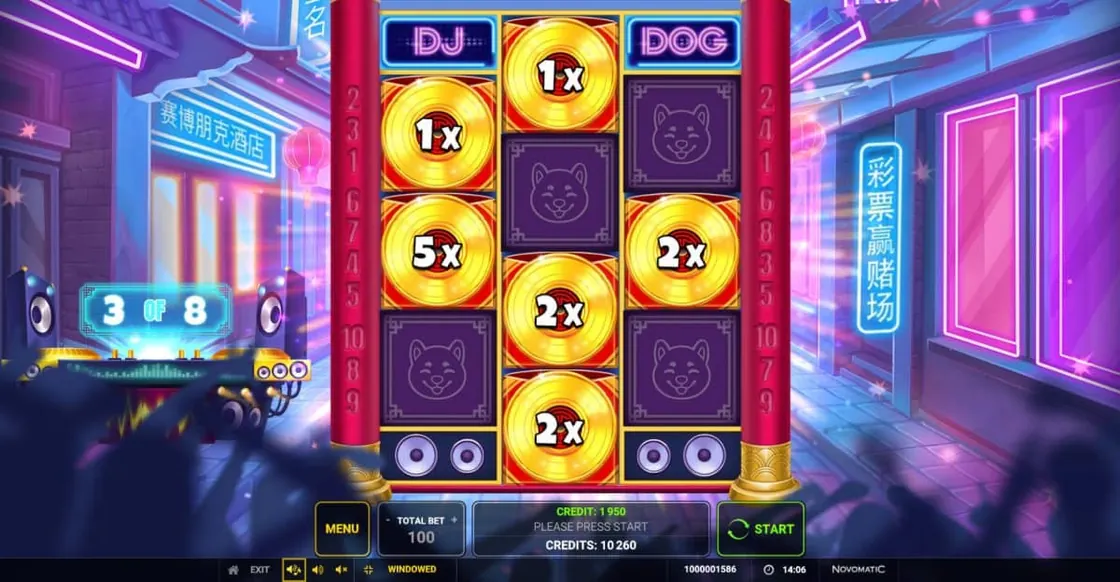
The control bar in full: menu on the left, total bet beside it, the credit and balance readings in the middle, start on the right, system row underneath.
How the panel is laid out
One strip, five jobs, read left to right. The menu button opens the game's own information; the total bet selector sits next to it with a figure between a minus and a plus; the middle of the bar carries the money readings; the start control closes the right-hand end, carrying the circular spin arrow that is the game's one universally understood icon.
Beneath that strip runs a thinner system row in a darker tone: an exit control, a group of sound switches, a windowed or full-screen toggle, a session identifier and a clock. The visual separation is doing real work — the things that change the game are on one bar, the things that change the window are on another.
Two numbers sit in the centre rather than one, which is the detail most worth pointing out. Our capture shows a credit figure and a separate credits total, with a prompt between them. A player who reads only one of them has read half of their position, and these are the readings that matter more than anything else on the screen.
What is on the bar
Read from our own capture of the running game. Nothing in this block comes from a catalogue, and nothing in it is a figure that could go out of date in the way a return percentage can.
Menu
left end of the bar
our own capture
Total bet
selector with plus and minus
our own capture
Credit
two readings, centre
our own capture
Start
right end, with the spin arrow
our own capture
Sound
master and effects, system row
our own capture
Window
windowed and full-screen toggle
our own capture
The stake, and checking it before the spin
The total bet control shows one figure and changes it in steps. That is the whole interaction, and it is the one every player should perform deliberately at least once per session, because a stake selector is the only control on this bar that can be left on somebody else's setting — yesterday's, or the default the game loaded with.
A catalogue states the range this title accepts as running from 0.10 to 50. That is one source and the studio does not confirm it, so treat it as an indication rather than a boundary; the figure the selector will actually accept is the one the operator has configured, and it is visible in the control itself.
The order that avoids surprises is unglamorous and worth saying: read the total bet, read both money figures, then press start. In a game where a spin resolves in about a second, those three readings are easier to take before the round than during it.
The sound switches, and what they cost you
The system row carries more than one audio control: a master and a separate effects switch, which is a courtesy not every game extends. You can keep the interface clicks and drop the music, or silence the lot.
Nothing is lost by doing so. The feature counter is printed, the value on every record is printed, the money figures are printed and the reels announce their own state visually. There is no event in this game that exists only as a sound, which means the audio controls are a genuine preference rather than a trade.
That is the reverse of the usual advice about music-themed slots, and it is the correct advice for this one. A game whose theme is a DJ set is obviously better with the sound on. It is not worse to read with the sound off, and those are two different statements.
The menu, and what belongs behind it
One button, and the most important one on the bar for anybody who wants a figure this site deliberately does not print. The game's own information pages are where the return percentage, the paytable and the rules live for the exact build the operator has loaded.
This is not a formality. Greentube publishes no return figure for this title on its own page, the only figure in open view belongs to a catalogue rather than to the studio, a second one circulates on a page that describes a different game altogether, and the studio ships this title in a plain build and a buy-in build. Under those conditions the only correct answer to what is the RTP is the one printed inside the machine you are looking at.
The same goes for the rules of the feature and the ladder of values a record can carry. The studio describes the feature in four sentences and publishes no value ladder at all; the menu is the place that does.
The system row, and the two controls people miss
The thin darker strip under the main bar is not part of the game and that is exactly why it is worth a look. In our capture it carries an exit control at the far left, the sound switches next to it, a windowed or full-screen toggle, then a long numeric session identifier and a clock at the right-hand end.
The window toggle is the first of the two that gets overlooked. On a desktop the game can run inside its page or take the whole display, and the difference is not cosmetic: full screen makes the figure printed on a record substantially larger, which is the single hardest thing to read in this game at a small size. If you are going to squint at anything, squint at it once and then change the window.
The clock is the second, and it is there for a reason that has nothing to do with the game. A game window has no address bar, no taskbar and frequently no daylight; a session can run a great deal longer than it feels like it has. An operator putting a clock in the furniture is handing you the one piece of information the rest of the screen is designed to make you forget, and it costs nothing to glance at.
The exit control belongs in the same paragraph. It closes the game and returns to the lobby, and the useful habit is knowing where it is before you want it rather than hunting for it afterwards. The session identifier beside the clock is the number support will ask for if anything ever needs looking into, which is the only time it matters and a bad moment to go looking for it.
Questions about the panel
Read from a capture of the running game.
Where is the stake set?
On the total bet control, left of centre on the main bar, which shows one figure and steps it up or down. Check it before the first spin.
Why are there two money figures?
Our capture shows a credit reading and a separate credits total in the middle of the bar. Reading only one of them gives half the picture.
Can the music be turned off separately?
The system row carries a master control and a separate effects switch, so the music can go while the interface sounds stay.
What is behind the menu button?
The game's own information and rules, including the return percentage for the exact build the operator has loaded. That is the figure to trust.
One page left: what happens to all of this on a phone, and which readings have to survive the move to a narrow screen.